Parents, families and caregivers who would like to find out their child’s classroom assignment have two options for accessing this information:
- At home on School-Day starting on September 7, 2026
- With the assistance of staff on the first day of school
To protect the privacy and personal information of staff and students, class lists will not be posted publicly on outside school windows or doors.
Please note: Class lists are subject to changes up until the morning of the first day of school.
View Classroom Assignments on School-Day (Starting September 7, 2026)
If you already use School-Day, you can log in after September 7 to see your child’s class placement.
How to Check Your Child’s Class Assignment
- Go to School-Day and log into your account.
- Click on the “All Students” drop-down box on your dashboard.

- Select your child’s name and then click “Schools and Groups” in the blue left-hand menu, then select “Your Classes” from the pop-out menu.
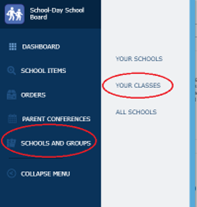
- You will now be able to see the homeroom classroom for your child. Schools will be sending out additional information about the teachers for each classroom.
New to School-Day? If you haven’t signed up for an account yet, step-by-step registration instructions are available on our website to help you get connected.
Find Classroom Assignments on the First Day of School
If you do not use School-Day, class lists will be available inside the school building on the first day of classes. Teachers and staff will also be stationed outside on the first day with class lists and will be able to assist you with locating your child’s teacher.
Questions about your child’s classroom or teacher?
Please connect directly with your child’s school.
Questions about student privacy and data:
- Email: records@wrdsb.ca
Frequently Asked Questions About Elementary Class Assignments
Can class list information change before the start of the school year?
Because parents, families and caregivers move and new students continue to register until the first day of school, class lists may experience minor shifts until the morning of Tuesday, September 8, 2026.
How do I sign up for a School-Day account?
Please refer to the School-Day Guide to learn how to register.
Need Help with School-Day?
If you run into any technical issues while using School-Day, please reach out to their support team directly:
- Online: Visit the School-Day Support Website.
- In-App: Submit a support ticket by clicking the question mark (?) button in the top right corner of your dashboard.
- Email: Send a detailed description of your problem to: support.ticket@school-day.com.
- Phone: Call the Support Desk at 1-855-253-1731 for 24/7 assistance (available in both English and French).